The flags come off: Git and library editing for everyone (devblog, weeks 40-43)
The last post was a quiet “what we are cooking” one. Then we went silent for four weeks, sorry for that. But we did not stop shipping: since then, 13 small releases went out (v0.2.5 to v0.2.11.5). Most of what was in them was behind feature flags, or smaller bugfixes, so there was not much you could see. This week the flags come off, so bear with us, this one is big.
Also: we are past 300 registered users. Welcome, all of you!
And a personal side project: I started a case study, building a MIDI controller as a programmer (not an electrical engineer), with pcbjam and some AI help. This led us to a lot of small bugfixes too. Part 1 goes out in the next few days, stay tuned.
The flags come off
Everything we build reaches production continuously, but we switch new things on for ourselves first. A feature flag lets us deploy a half-finished screen, use it on real projects, and fix it before anyone else has to suffer it. The cost is what you saw from the outside: a lot of releases, and very little that changed for you.
v0.2.12 removes a lot of those flags. Everyone gets the following.
Git
As I described in the last post, we had a “working” Git integration, but it needed some smoothing. We added these:
- A new project screen. Start a project empty, from an upload, or from a Git URL. GitHub, GitLab, Gitea and Forgejo are detected from the URL, and you can save credentials for each. If the repository is empty, we offer a first commit with a KiCad
.gitignorein it (and you can start from a curated fab profile, see below). - Branches are working copies. Pick a branch and you get your own copy of it. If a teammate picks the same branch, you edit it together, live. A Git page lists branches and history, the project page has a small Git panel, and changes on the remote come in automatically.
- Commit messages that say what changed in the design. Before, a commit said things like “changed 40 wires, changed 54 labels”. Now it says “added C8 (100nF) and R9 (10k) and wired them to RESET”, per file and per person, and a cosmetic shuffle collapses to “rearranged the sheet around U1”. The text comes from fixed templates over the netlist and placement, not from an AI, so no design data leaves pcbjam and the same change always reads the same.
- ERC and DRC run in the background on the KiCad projects that changed, and the commit gets a one-line verdict (“DRC: 2 errors in main.kicad_pcb”). They never block a commit.
- Readable diffs. The first version wrote each file into the repository as a single line (a bug), so every commit was one giant change. Now files are written in KiCad’s own layout, so a one-line change is a one-line diff. “View on GitHub” links take you from a commit to the host.
- Faster. Preparing a commit on our test repository took 4 to 5 minutes at the start of the month. Now it takes about 15 seconds. Connecting the repository the first time went from about 3 minutes to under one.
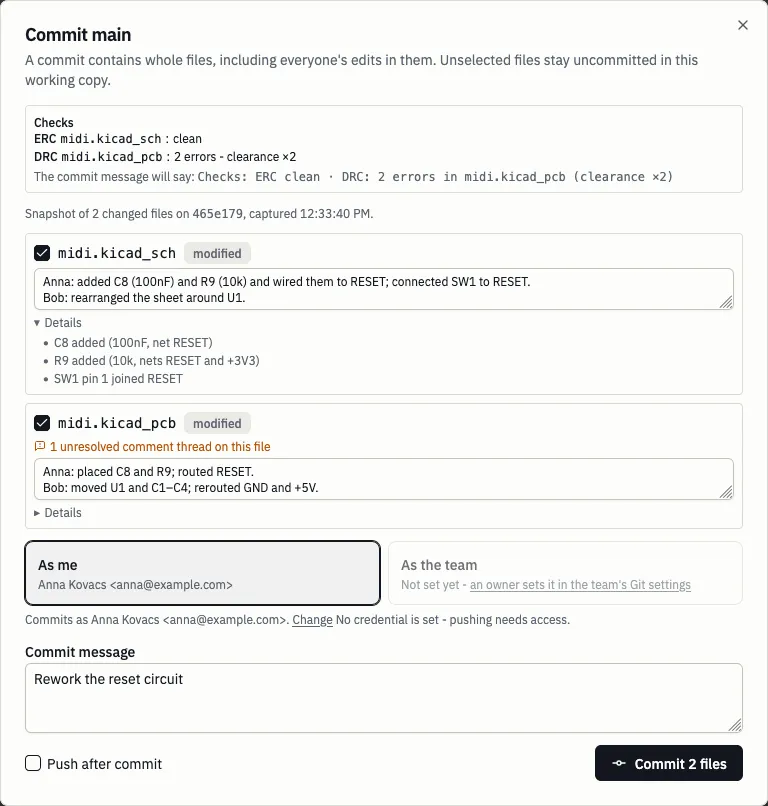
Still no in-app conflict resolution and no force pushes. That was the plan, and it stays the plan.
Libraries you write yourself
- A team library from any folder of a Git repository, with its 3D models and datasheets. Edit it in the symbol and footprint editors, then Push: a window shows the changes and lets you edit the commit message.
- Delete, copy and move symbols and footprints between libraries. A deleted library goes to the trash first.
- Team owners can switch a library between public and private.
- The library page has a section per team, a folder tree for the repository, and a 3D model preview.
Smaller things that come with it
-
New KiCad project, with fab templates. A dialog creates the project files from a template: KiCad’s defaults, PCBWay or JLCPCB, with their design rules filled in. Every value cites the manufacturer’s page it came from, and a daily check tells us when one of those pages changes. The templates are open source in
@pcbjam/shared, so fixes and reviews are welcome.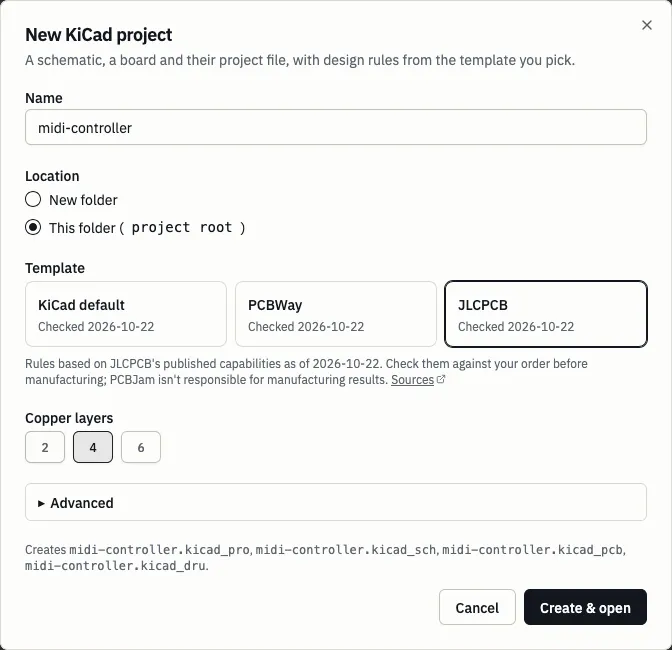
-
Fork a public project into your personal space, with a link back to the original.
-
@mentions land in an inbox, so a comment that names you does not get lost.
-
Portable export: a zip that opens in desktop KiCad 10, with the libraries it needs bundled.
Checking a footprint against its datasheet
This one has been live since v0.2.11, without a flag.
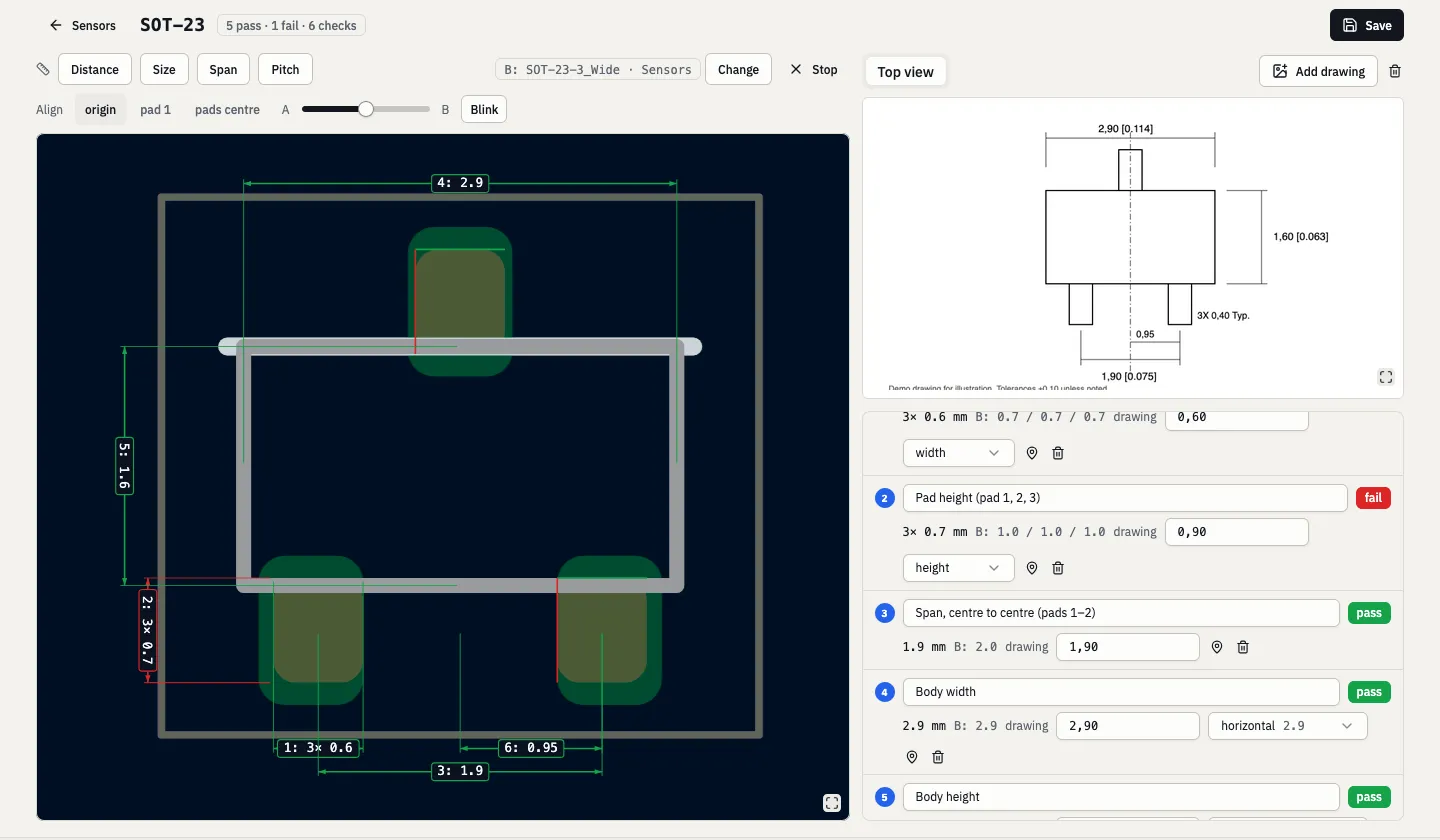
Checking a new footprint by hand means opening the datasheet’s mechanical drawing and checking the footprint against every number on it. Drawings don’t make it easy. Sometimes they are not to scale, or badly pixelated. Some numbers are measured from a center line and some from an edge, some are in parentheses because they are “for reference only”, some use a comma as the decimal separator, and some have the inches in brackets next to them.
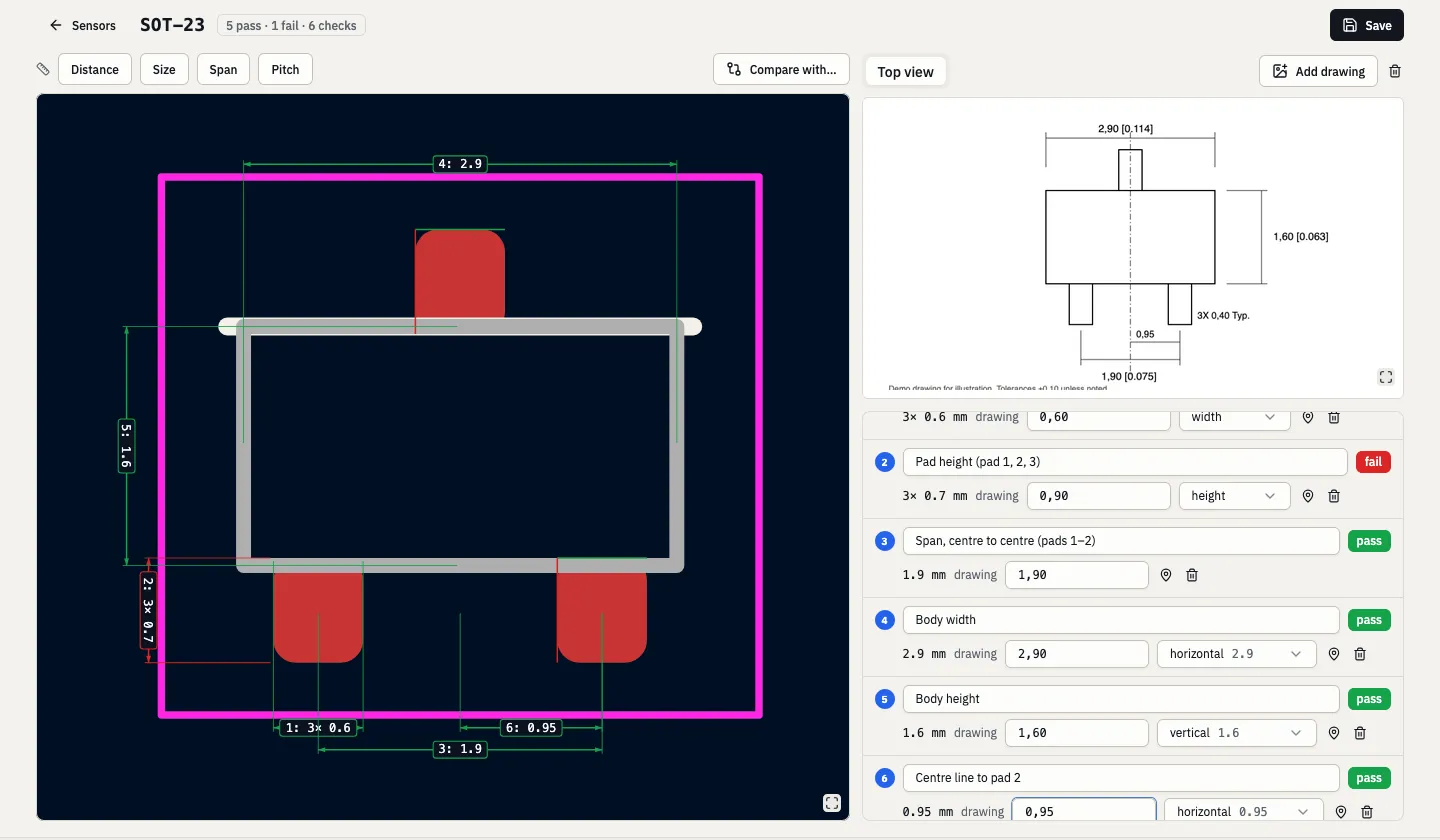
The printed numbers are the truth. The checker opens the footprint on the left and the datasheet on the right.
You cut out the drawing that you need from the PDF, pick the two points on the footprint a number refers to, and type the number as it is printed (2.54*(8-1)=17.78, 3X 0,40 Typ. and ± tolerances all work).
Each measure becomes a check that passes or fails, and the checks are saved with the footprint, so the next reviewer sees what was checked against which number.
The tool suggests (prefills) the measures that usually matter (pitch, pad size, span), and you can delete and/or add more of them.
You can also put a second footprint on top, from any library or pasted from a .kicad_mod, and run the same checks on it, or just compare the two footprints against each other.
If you check footprints and miss something here, come to our Discord and tell us.
What went to production
Everything above, plus the rest of v0.2.5 to v0.2.11.5 and v0.2.12.
A new look
- One component library for the app and the panels inside the editor, with IBM Plex Sans and a palette borrowed from KiCad’s layer colors. 37 different native dropdowns became one.
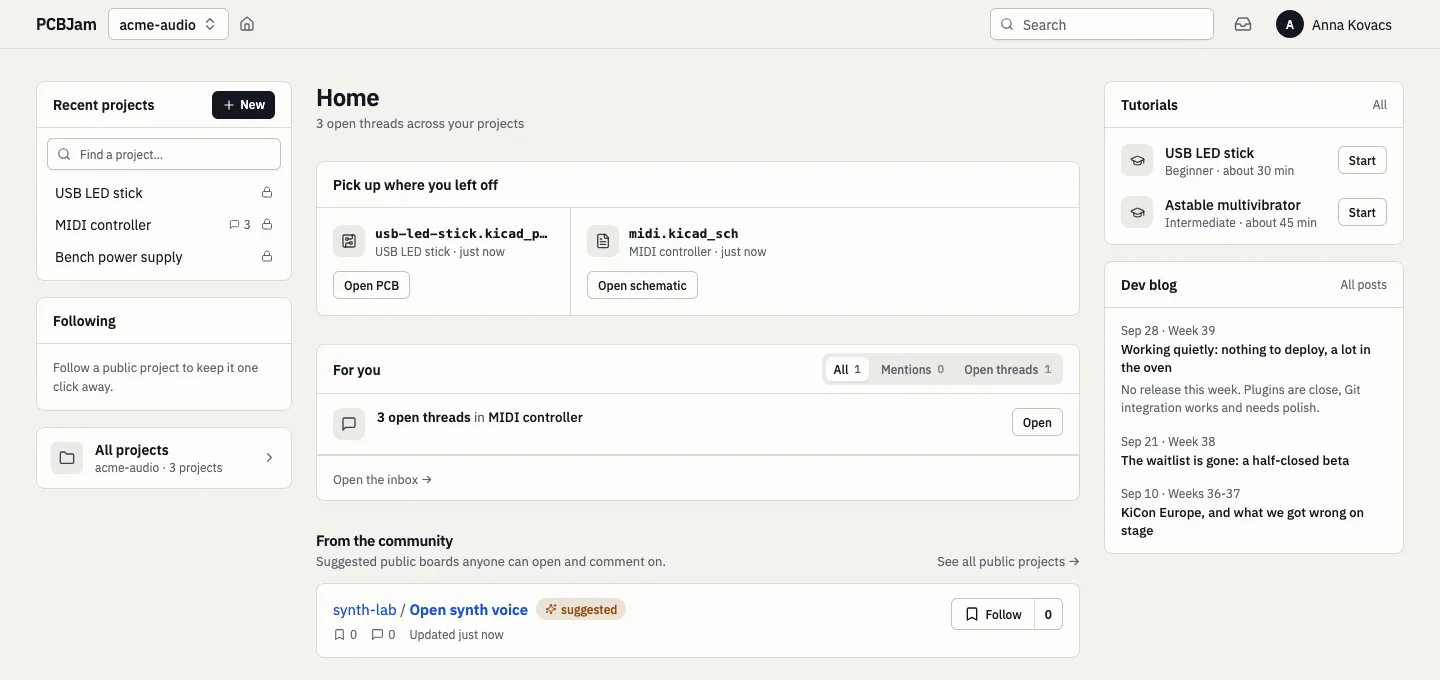
- A new home page: your recent projects across all your teams, “pick up where you left off” with direct Open schematic / Open PCB buttons, a “For you” box with your mentions and open threads, and this blog.
- The project page is a workspace: a side panel (Quick actions, Git, Libraries, Plugins) next to one file tree. On a phone it becomes a tab bar.
- Docs at app.pcbjam.com/docs, including a page for each fab template with every value and its source. (It also has work-in-progress plugin and MCP docs, but those features are still behind feature flags and may change.)
- We have first-party tutorials (a USB LED stick and a multivibrator) that walk you through the editor with a guide overlay.
Editor
- KiCad 10.0.6, then 10.0.7. The second one brings an upstream fix that matters: zone refill no longer pours copper over other nets’ pads and vias.
- Add Symbol opens much faster. The symbol chooser is now filled from a prebuilt library index, and a symbol is only parsed when you preview or place it. It feels fast now, close to how it feels on the desktop, and some of the old loading screens are gone because of it. The footprint chooser, the footprint editor’s tree and CvPcb use the same index.
- A cold editor load makes far fewer requests. It used to make about 529, almost all of them asking for a team’s (empty) overrides of each official library. Now the list comes with the boot.
- DRC, zone fill and ERC no longer freeze the tab. The progress dialog moves and Cancel works. Firefox can still stall for about a second.
- Cross-probing between tabs: select something in the schematic tab and the PCB tab shows it, and the other way around.
- Gerbers and drill files from Plot land in the project, instead of nowhere.
- Schematic locks hold: when a teammate is editing something, your drag no longer moves it, and a drag that waited for the editor replays smoothly.
- Fixes in our wxWidgets port (the UI toolkit KiCad is built on):
- submenus open beside their row, horizontal scrolling works, and Enter commits a grid cell;
- hotkeys work before the first click, editing a hotkey no longer crashes the editor, and Escape no longer exits fullscreen;
- a laptop with a touchscreen gets the desktop editor, not the phone one.
- When Firefox runs out of memory, you get a recovery page instead of a dead tab.
- Simulator workbooks are saved with the project, and people viewing a board see the 3D models from its team libraries.
Speed, postponed
The last post ended with speed work inside KiCad itself, and a “5x is a conservative guess”. We decided to postpone it. Instead of one big change, we will split it into smaller, contained pieces and post them on the KiCad forum, to see whether upstream is interested at all. If they are not, we will have to decide whether we want to diverge from KiCad, and that is not a small decision. The two rebases (10.0.6, then 10.0.7) were the first step either way.
Behind the scenes, CI moved to faster machines and stopped testing the same commit twice.
In the queue
- Plugins, still in preview. In the last post plugins were “close to release”. Since then, a plugin can edit the open design and call an HTTPS service, and a published plugin can’t change under you after you install it. Plugins stay off in production until we are happy with them, but the tutorials already run on their core.
On paper
- A self-hosted pcbjam. We ran a spike: the web app, the PCB editor and live multiplayer editing, all on a self-hosted runtime on one machine, in about two hours. A real product needs a lot more than that (how we send emails, how logins and login providers work, updates, and so on). If you want a self-hosted pcbjam (and would be happy to pay for it), write to us by email or on Discord, so we know to move it up the list.
- We are also playing with an AI assistant in the editor. It is early.
That is four weeks in one post. If you hit a bug, have an idea, or just liked something, come to our Discord and tell us, the good and the bad too.